
Create Professional Email Signatures in Seconds
Overview
The Email Signature Generator is a free web-based tool designed to help users create professional and visually appealing email signatures compatible with major email platforms. It supports Gmail, Outlook, Yahoo Mail, and Mozilla Thunderbird, making it a versatile solution for individuals and teams who want to maintain a consistent professional presence across email clients. The tool generates HTML-based signatures, ensuring compatibility and consistent rendering regardless of the recipient’s email setup.
It is ideal for professionals, freelancers, and small business owners who need to present a polished image through their digital communications. The tool eliminates the need for manual coding or design work, allowing users to customize text, logos, social media links, and contact details through an intuitive interface. Real-world use cases include sales representatives building branded signatures, remote workers enhancing their email professionalism, and entrepreneurs promoting their personal brands.
The developer did not provide additional information about the company or background. As a web-based application, it does not require installation and can be accessed from any device with a modern browser. No specific system requirements were listed, but its cloud-based nature suggests minimal local resource usage.
Key Features & Capabilities
- Multi-Platform Compatibility – Generates signatures that work seamlessly with Gmail, Outlook, Yahoo Mail, and Mozilla Thunderbird, ensuring consistent appearance across all major email clients.
- HTML Signature Output – Produces clean, standards-compliant HTML code that integrates directly into any email program without formatting issues.
- Customizable Design Elements – Users can add and edit text, upload logos, insert social media icons, and include contact details like phone numbers and websites.
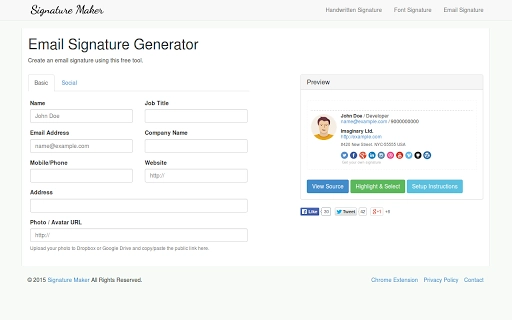
- Real-Time Preview – Offers an instant preview of how the signature will appear in different email clients, helping users avoid layout distortions.
- One-Click Export – Allows users to copy the generated HTML code with a single click, streamlining the integration process into their email accounts.
These features enable users to build branded, professional signatures without technical knowledge. For example, a marketing manager can quickly generate a signature with company branding, while a consultant can add multiple contact methods and social links. The tool supports responsive design principles, so signatures adapt well to both desktop and mobile email views.
User Interface, Workflow & Performance
The interface is clean and minimal, focused on functionality rather than visual clutter. Navigation is straightforward, with clearly labeled sections for text input, logo upload, and social media integration. The workflow follows a logical sequence: customize content → preview result → export HTML code.
As a web-based application, the tool relies on the user’s browser for processing, which means performance is generally stable as long as the internet connection is reliable. The developer did not specify resource usage details, but since no local installation is required, CPU and RAM impact is negligible on the user’s device.
Stability is expected to be consistent due to the absence of local file dependencies. However, functionality is dependent on internet access and the browser’s ability to render HTML correctly. Users may experience delays during the preview phase if large images are uploaded, though no performance benchmarks were provided.
Compatibility & System Requirements
The Email Signature Generator is accessible on both Windows and Mac operating systems, supporting modern web browsers such as Chrome, Firefox, Safari, and Edge. No installation is required, as it operates entirely through a web interface.
Exact system requirements were not listed. The application’s cloud-based nature suggests that it is designed to work with standard computing hardware and internet connectivity. Compatibility information is limited to the supported platforms and email clients mentioned in the description.
Pros and Cons
Pros
- Free to use with no hidden costs
- Supports major email clients including Gmail, Outlook, Yahoo Mail, and Thunderbird
- Generates clean, compatible HTML code for seamless integration
- Intuitive interface with real-time preview
- No installation required – accessible from any device with a browser
Cons
- No offline functionality – requires internet access
- Limited customization beyond basic design elements
- No built-in template library or design inspiration
- Dependent on browser performance and internet stability
- Developer background not disclosed
FAQ Section
Is the Email Signature Generator safe to use?
The tool operates in the browser and does not collect or store user data. All processing happens locally in the user’s browser, making it a secure option for creating email signatures.
Can I use this tool offline?
No, the Email Signature Generator is a web-based application and requires an active internet connection to function. It cannot be used without access to the web.
What email clients are supported?
The tool generates HTML signatures compatible with Gmail, Outlook, Yahoo Mail, and Mozilla Thunderbird. These are among the most widely used email platforms.
Is there a license or subscription required?
No, the tool is completely free to use. There are no subscriptions, premium tiers, or licensing fees.
How do I integrate the generated signature into my email client?
After generating the HTML code, copy it and paste it directly into the signature settings of your email client. Instructions vary slightly by platform but are generally straightforward.
Final Thoughts
The Email Signature Generator delivers a simple, effective solution for creating professional email signatures across multiple platforms. Its focus on compatibility, ease of use, and zero cost makes it a strong choice for individuals and small teams seeking to enhance their digital communication presence. While it lacks advanced design features and offline access, its core functionality is reliable and well-executed.
Professionals who value consistency, branding, and efficiency in their email correspondence will benefit most from this tool. For those needing more complex designs or templates, additional tools may be necessary, but for basic to intermediate needs, this free web-based utility stands out.
Download the Email Signature Generator now and elevate your email professionalism in minutes.







